
Colors & Material Presets
Color in BLNG comes from two places: the Color picker for any custom shade, and the jewelry-ready preset libraries of pearls, metals, gemstones, and enamels.
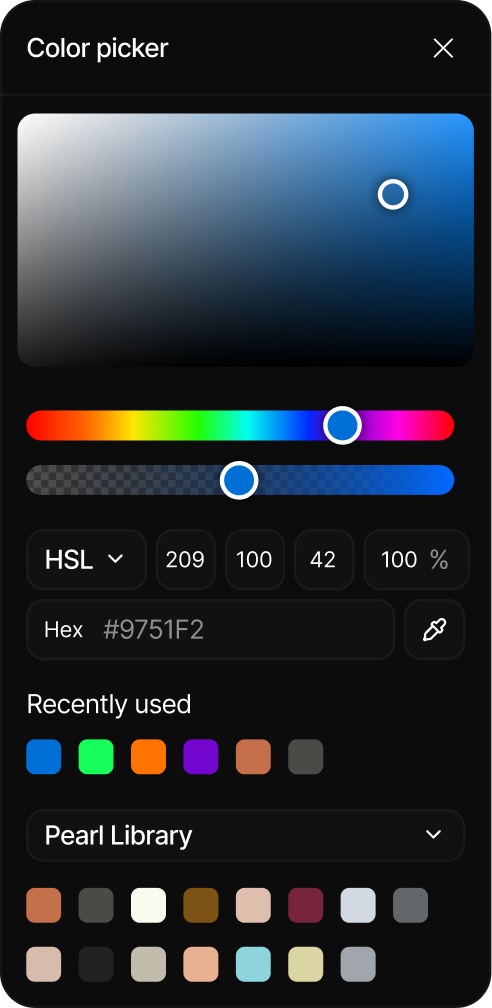
Color picker
The Color picker sets the color you paint with. Open it from the color swatch in the toolbar, or press C. The same picker opens from the other color controls in the editor, such as a shape's fill and stroke, the text color, and the canvas background.
Choosing a color
Drag in the color field to pick a shade, then fine-tune it with the inputs:
| Input | What it does |
|---|---|
| Hex | Enter an exact hex value (for example #1A1A1A). |
| RGB / HSL / HSB | Switch the numeric fields between color modes and type precise values. |
| Opacity (%) | Set how transparent the color is. |
While you are editing a mask, the picker switches to a greyscale Value control and hides the recent colors and the preset libraries, because a mask is defined in black and white rather than color. See Masks.
Eyedropper and recent colors
- Eyedropper: sample any color already on your canvas. Use the eyedropper button in the picker, or press I.
- Recently used: your last 8 colors are kept here for quick reuse. Before you have picked any, it reads “no recently used colors”.
Presets
Presets are curated color libraries built for jewelry and product design. Instead of dialing in a hex value, you pick a ready-made swatch and it becomes the active color.
| Library | Contains |
|---|---|
| Pearl Library | 12 pearl tones, including South Sea Golden Pearl, Akoya White Pearl, and Tahitian Black Pearl. This is the default library. |
| Metal Library | 4 metals: Sterling Silver, Yellow Gold, Rose Gold, and White Gold. |
| Diamond Library | 16 diamond colors, including Diamond White, Diamond Champagne, and Diamond Black. |
| Gemstone Library | 24 gemstone colors, including Ruby, Emerald, Paraiba Tourmaline, and Lapis Lazuli. |
| Morganite Library | 5 morganite tones, from soft pink to champagne. |
| Additional Stones Library | 5 more stones: Rose Quartz, Moss Agate, Tigers Eye, Amazonite, and Onyx. |
| Enamel Library | 9 enamel colors, from black and white to red, green, and yellow. |
| Background Library | 4 studio backdrop colors: black, blue, white, and warm. |
Using a preset
- Open the Color picker (
C). - Open the library dropdown and choose a collection.
- Hover a swatch to read its name, then click it to make it the active color.
Presets keep color consistent across a design: pick a metal or a gemstone once and reuse it on every element.